Can I control my industrial door via a smartphone app? In many systems, yes—but the answer depends on the door operator, its control unit, and the app’s communication hardware. A phone cannot simply connect to every industrial door. The operator must support a compatible access-control module, such as a manufacturer-approved Wi-Fi, cellular, or Bluetooth gateway.
Picture a warehouse manager checking the app before opening the loading bay. The screen may show whether the door is open, closed, or moving. Depending on the system, the manager can send a command, review activity, or receive an alert if the door remains open. Useful details matter: signal coverage near the doorway, user permissions, power backup, and whether the app reports status accurately. An app can make operation more convenient. It does not replace safe installation, routine inspection, or the door’s physical safety devices.
The supplied material does not identify an industry expert or provide a verifiable quotation. Rather than invent a name or attribute unsupported words to a real person, this introduction leaves that quotation out. Add one only after confirming the expert’s identity and the original source. That may feel less polished. It is more trustworthy. Before choosing an app, confirm compatibility with the exact operator model and ask the installer how remote commands interact with obstruction detection, emergency controls, and local operating procedures. Convenience is valuable. Reliable confirmation is essential.
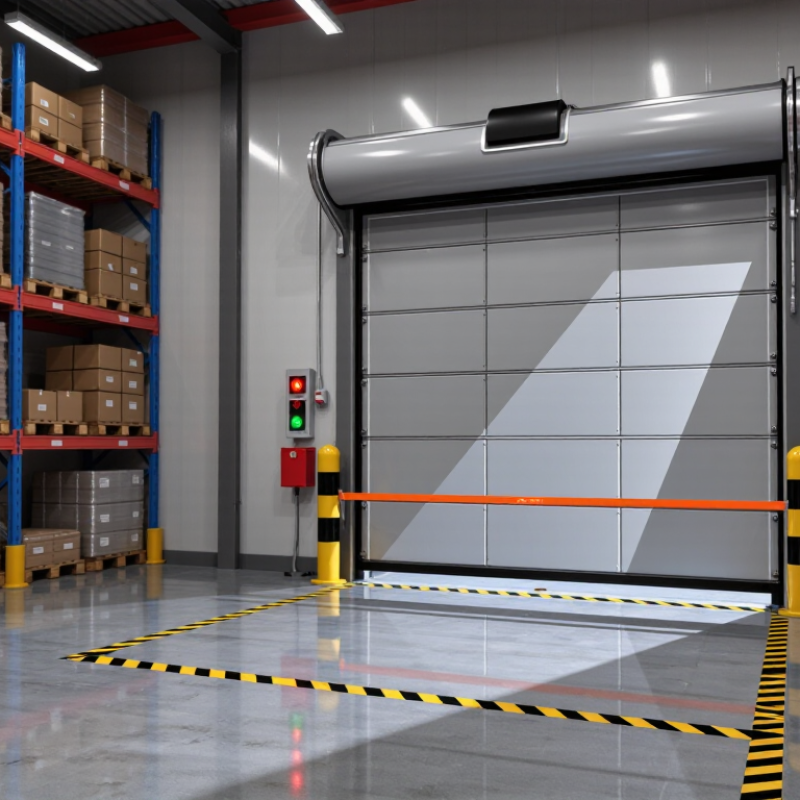
An industrial door app is usually a remote interface, not the motor’s brain. The phone authenticates a user, then sends a command through Bluetooth, Wi-Fi, or a secure internet connection. A site gateway passes that request to the door controller. Not magic. The controller still checks operating conditions before activating the motor.
Sensors matter more than the screen. Photoelectric beams, safety edges, and position switches can detect an obstruction or confirm whether the door reached its limit. If the network drops, remote commands may stop working; local controls should remain available. A phone notification is useful, but it cannot prove that a door is safely closed. That distinction is easy to overlook during a busy shift.
Security deserves equal attention. Verizon’s 2024 Data Breach Investigations Report found that 68% of breaches involved a non-malicious human element, such as mistakes or social engineering. IBM’s 2024 Cost of a Data Breach Report estimated the global average breach cost at US$4.88 million. These figures are broad benchmarks, not industrial-door incident rates. Still, they support practical safeguards: use individual accounts, strong authentication, limited permissions, and reviewable access logs. Test the door’s sensors and fallback controls on site, too. A tidy app interface can hide a rough operational reality.
Connecting an industrial door to a smartphone app takes more than a wireless signal. The usual setup includes a compatible door operator, a communication gateway, a network connection, and the app. The operator handles motor commands; the gateway passes information between the door and phone. A position sensor can report whether the door is open, closed, or stopped midway. That status matters.
A warehouse manager can check a loading-bay door after delivery, then send a close command from a phone. Safety edges and photoelectric sensors should remain connected to the operator’s safety circuit. They must not rely on a phone. Network loss should not disable local controls or safety devices. Remote access also needs individual user accounts, strong authentication, and a record of commands.
Before installation, confirm that the operator supports app control and that its inputs match the gateway. A qualified door technician can check wiring, stopping behavior, and manual operation during a fault. Wi-Fi can be unreliable around metal-clad bays, so test the signal near the control cabinet. The setup can feel fussy. An app screen cannot prove the doorway is clear; someone still needs to assess the site.
Before adding phone control, identify the door operator, its control board, and the way it accepts commands. A smartphone app cannot make every motor compatible. Not always. Many systems use a low-voltage input, such as a momentary push-button terminal, while newer controllers may support a network gateway. Check the operator manual for approved accessories, input voltage, and whether an external controller can work alongside safety devices. Do not assume a wireless receiver can connect directly. Some terminals look alike but serve different functions. That detail matters.
Have a qualified door technician inspect the wiring and confirm that photo eyes, edge sensors, emergency stops, and hold-to-run settings remain active. The app should send an open or close request, not bypass those protections. Setup usually involves fitting a compatible interface, connecting it to the designated control input, pairing it with a secure site network, and assigning access to named users. Test from a clear view of the door: try each command, verify the warning light and reversal response, then check operation during a network outage. Keep a physical control available. I would also document who has access and remove old accounts when staff leave; this is easy to overlook. Industrial sites differ, so a technician should confirm the final configuration against the door’s manual.
An industrial door app can make routine operation easier, but convenience depends on a reliable setup. Before connecting it, check that the door controller supports app operation and that installation follows the equipment maker’s instructions. A clear open-or-closed status is useful when the door is out of sight. Keep access credentials private. A phone signal or network connection may fail.
For shared sites, give each worker an individual login rather than passing around one password. Limit permissions to the tasks each person needs, and remove access promptly when a phone is lost or a worker leaves. Review access records periodically, if the system provides them. That helps identify unusual activity, though a record cannot prevent every mistake. Keep the door’s safety sensors and emergency controls active; an app should not replace them. Test operation from a safe position, especially after network or controller changes.
I would still keep a local control method available. It is easy to assume the app will always work. That assumption deserves a check.
A smartphone app can make an industrial door easier to operate, but it should not replace the door’s safety systems. The app sends a command; photo eyes, safety edges, and other protective devices must still work independently. Keep people, forklifts, and stored materials clear while the door moves. If a sensor is damaged or the door stops behaving normally, stop using remote operation and arrange an inspection. Never bypass a safety device to keep production moving.
Connectivity can be less dependable than it appears. A weak signal near a metal-clad loading bay may delay a command, while a network outage can leave the app unable to respond. Test operation from the intended locations, and make sure authorized staff know how to use the local control station. Use individual accounts and remove access when roles change. A phone screen can make a fault seem simple. Sometimes it isn’t.
Ongoing maintenance matters more than the convenience feature. Check the door’s movement, warning lights, sensors, and visible tracks as part of routine site checks. Look for unusual noise, uneven travel, or a door that reverses unexpectedly. Don’t adjust cables, springs, or other high-tension parts yourself; have a qualified technician inspect them. Keep the app and connected control equipment updated, but follow the door system’s maintenance instructions. A quick test is useful, though it cannot replace a proper inspection.
The phone sends an open or close request through Bluetooth, Wi-Fi, or a secure internet connection. A site gateway passes it to the controller, which checks operating conditions.
Usually, no. The app is a remote interface; the door controller remains responsible for operating the motor.
Remote commands may stop working. Local controls should remain available. Keep a physical control accessible.
No. A notification is not proof. Check the door and its position indicators on site.
Identify the operator and control board, then check the manual for approved accessories and input requirements. Similar-looking terminals can serve different functions.
Photoelectric beams, safety edges, emergency stops, and other fitted protections should remain active. The app should not bypass them.
Test each command from a clear view. Check warning lights, sensor responses, and operation during a network outage. Easy to overlook.
Use named accounts, strong authentication, limited permissions, and reviewable logs. Remove former staff accounts. I would check twice.
Can I control my industrial door via a smartphone app? In many cases, yes, provided the door operator is compatible with a suitable control module and the system is configured correctly. The setup typically links the door’s control unit to a secure network and an app, allowing an authorized user to check its status and send open or close commands. Before installation, confirm that the door and operator support this type of connection, and follow the manufacturer’s instructions or consult a qualified installer.
An app can make day-to-day operation more convenient, but it should not replace safe operating practices. Use strong account protection, grant access only to people who need it, and check the door’s surroundings before operating it remotely. Safety sensors and other protective features must remain functional, and a remote command may not work if the network or power is unavailable. Regularly inspect the door, test its safety features, update the app and control system when needed, and address connectivity problems promptly.

Labor Door